
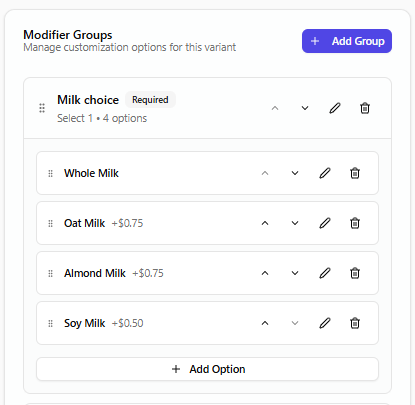
Modifier options allow customers to customize products, such as choosing milk types, add-ons, or extras. These are added inside modifier groups and attached directly to products.
- Go Catalog > Products
- Open the product you want to edit
- Scroll down to Modifier Groups, select Add Group
- Enter the Modifier Group name (required)
- Set the Minimum and maximum selections
- Select Choose Modifier Set (attaches options)
- Inside the modifier group, select Add Option
- Enter the Option name
- Set the Option price (optional)
- Select Save
Use clear, purpose-based names for modifier groups, keep products limited to two or three modifier groups, and avoid complex configurations that can slow down checkout and decision-making.
Congratulations, you have created your first modifier set. Repeat the above sets to configure your menu.