
Display important dietary information, allergen details, and spice levels directly on your menu items.
Watch our video guide
Learn all you need to know in this 3 minute overview.
What are dietary and allergen tags?
Dietary labels
Display helpful dietary information on menu items, such as Vegetarian or Gluten-Free, so customers can quickly understand whether an item fits their preferences.
Allergen tags
Show clear allergen details on menu items, giving customers visibility into ingredients and helping them make informed ordering decisions.
Adding labels on menu items
Follow the quick steps below to update your menu items.
- Go to OtterOrder ➜ Catalog ➜ Products
- Select an item and click View
- Scroll down to the Dietary info section
- Assign Dietary labels as needed
- Assign Allergen labels as needed
- Click Save to confirm your changes

Customer experience
See below for visual examples of how dietary labels and allergen information are shown to customers.
Dietary labels
- Displayed on menu item cards in abbreviated form
- Shown on the item detail view alongside the item description
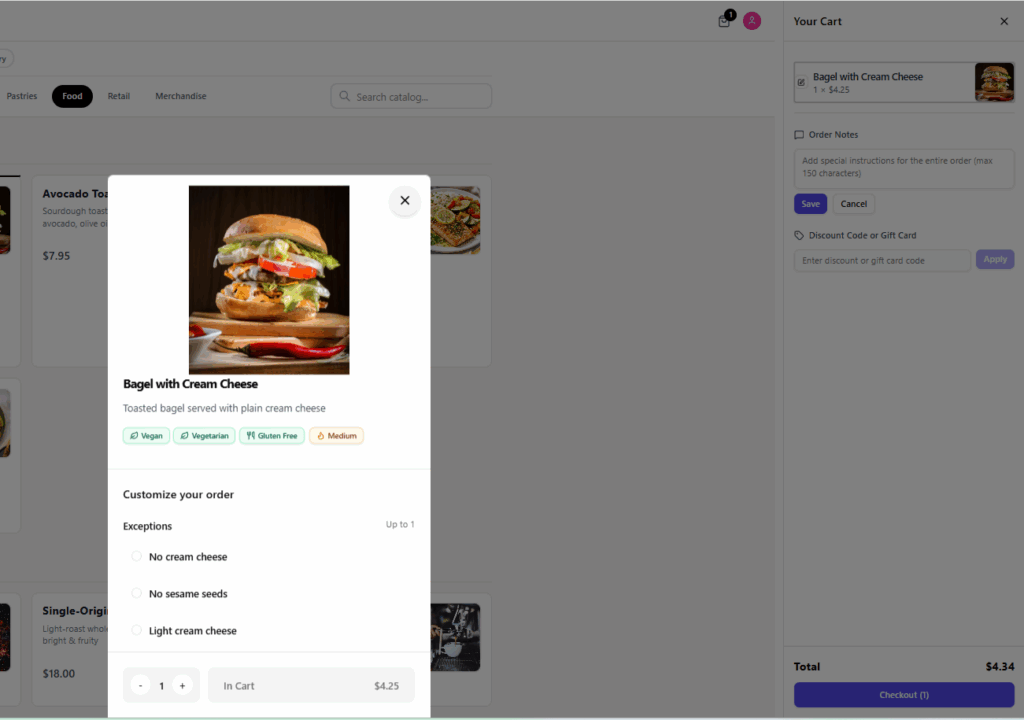
Allergen tags
- Shown on item detail modal alongside the description

