
Webhooks let OtterOrder send information to another system the moment something happens — for example, when a new order comes in or a customer updates their details.
If you use any external tools (a CRM, delivery system, marketing platform, or your own internal software), webhooks keep everything in sync automatically so you’re not updating things by hand
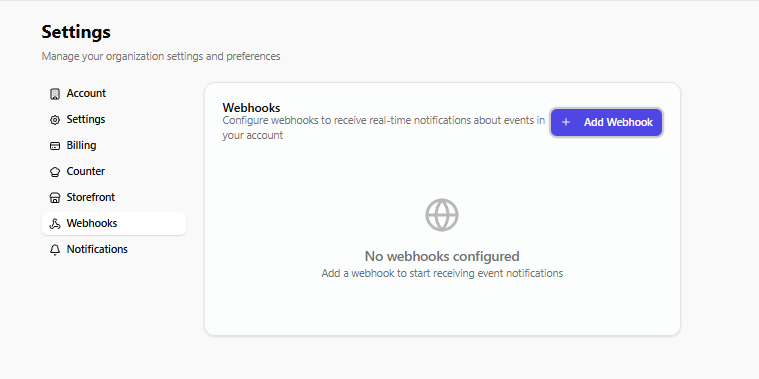
How to Add a Webhook
- Go to Settings in your OtterOrder dashboard.
- Click Webhooks on the left.
- Hit Add Webhook.
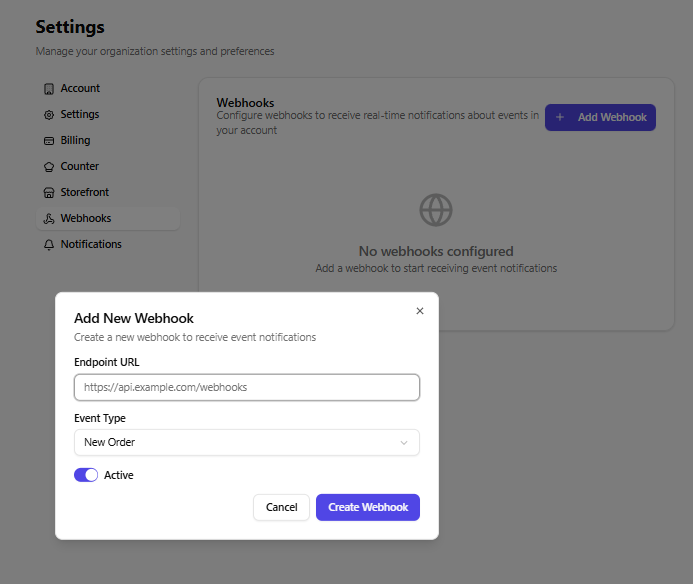
- Paste the endpoint URL your other system provides — this is where OtterOrder will send the updates.
- Choose the type of event you want to send.
- Turn the webhook Active and click Create Webhook.
That’s all — from now on, OtterOrder will push updates to that URL instantly.
Why You’d Use This
Most businesses use webhooks when they want their systems talking to each other without manual work.
For example:
- sending orders straight into another platform
- triggering a workflow in your CRM
- updating customer data elsewhere
- notifying an external delivery or fulfillment system
If your operations depend on multiple tools, webhooks help keep everything connected and up to date in real time.